ヘルプ ネットワーク メトリック ネットワークインターフェースの設定ルール
ネットワークインターフェースの設定ルール
目次
- 設定ルールとは
- ユースケース
- サポートされているインターフェースレベル
- インターフェースの設定ルールの作成
- 設定ルールでサポートされるインターフェースアクション
- 既存のインターフェースでルールを実行する
- ベストプラクティス
Site24x7の設定ルールは、ルーター、スイッチ、ファイアウォール、WLC、その他のネットワーク装置で検出されたネットワークインターフェースを自動的に分類、整理、管理するのに役立ちます。これらのルールは、インターフェース属性に基づいてタグ、しきい値、監視グループ、自動化テンプレートを適用することで、繰り返しの設定作業を削減します。
このドキュメントでは、ネットワークインターフェースでの設定ルールの仕組みと、設定ルールを作成、適用、管理する方法について説明します。
設定ルールとは
設定ルールを使用すると、特定の名前、タイプ、IP、動作ステータス、管理状態を持つインターフェースなど、特定のネットワークインターフェースに一致する条件を定義し、検出時または後続の更新時に構成設定を自動的に適用できます。
ルールは次の場合に適用できます。
- 新しいネットワーク装置がオンボードした場合
- 既存の装置配下に新しいインターフェースが検出された場合
- 既存のインターフェースの属性が変更された場合
- 設定ルールを選択した装置で手動で実行した場合
ユースケース
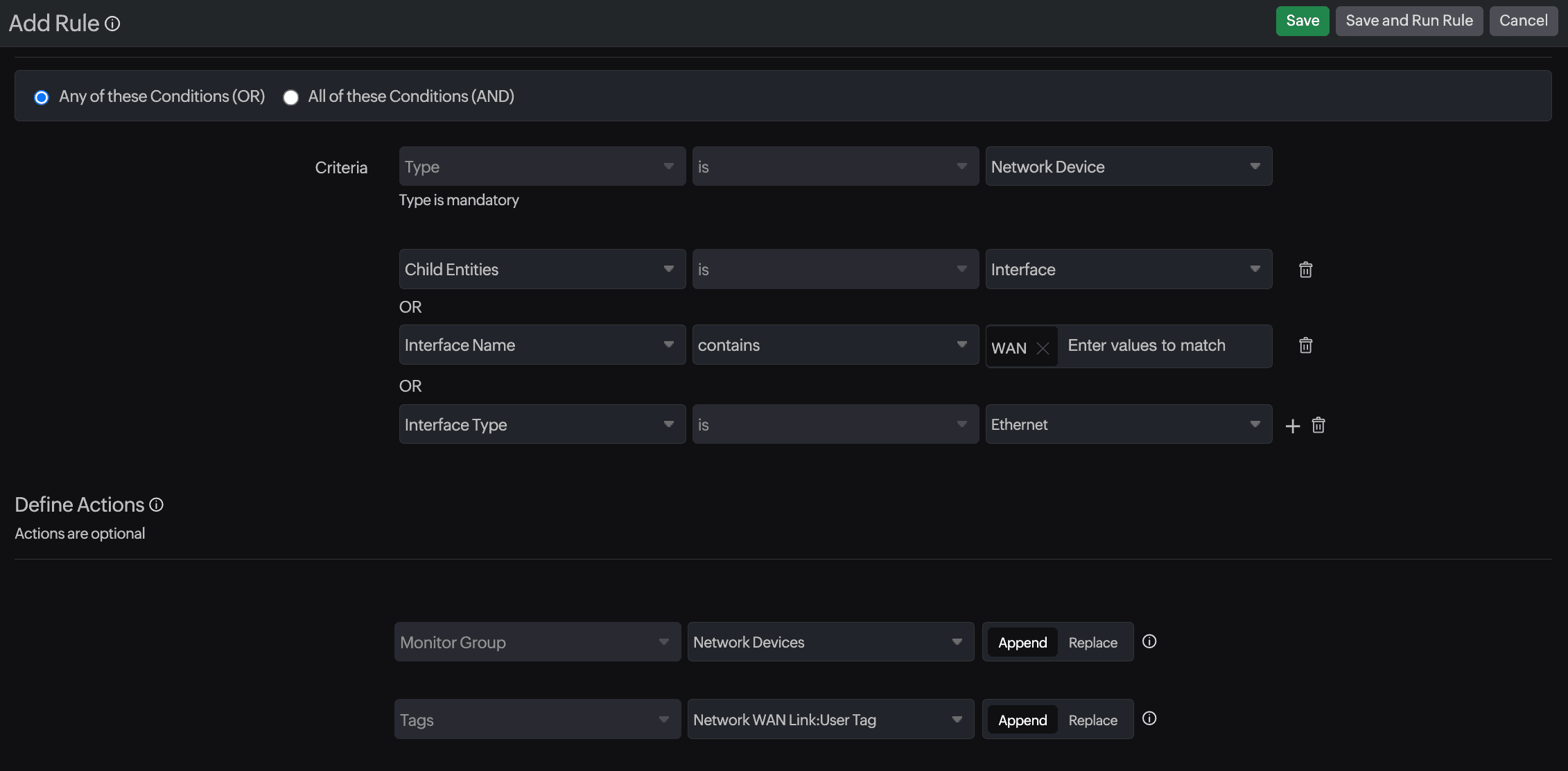
1.WANインターフェースを監視グループに追加したい。
設定ルールで指定する「基準」:
- インターフェース名:次を含む:WAN
- インターフェースタイプ:イーサネット
アクション:
- 監視グループをネットワーク装置に設定
- 監視にタグを追加
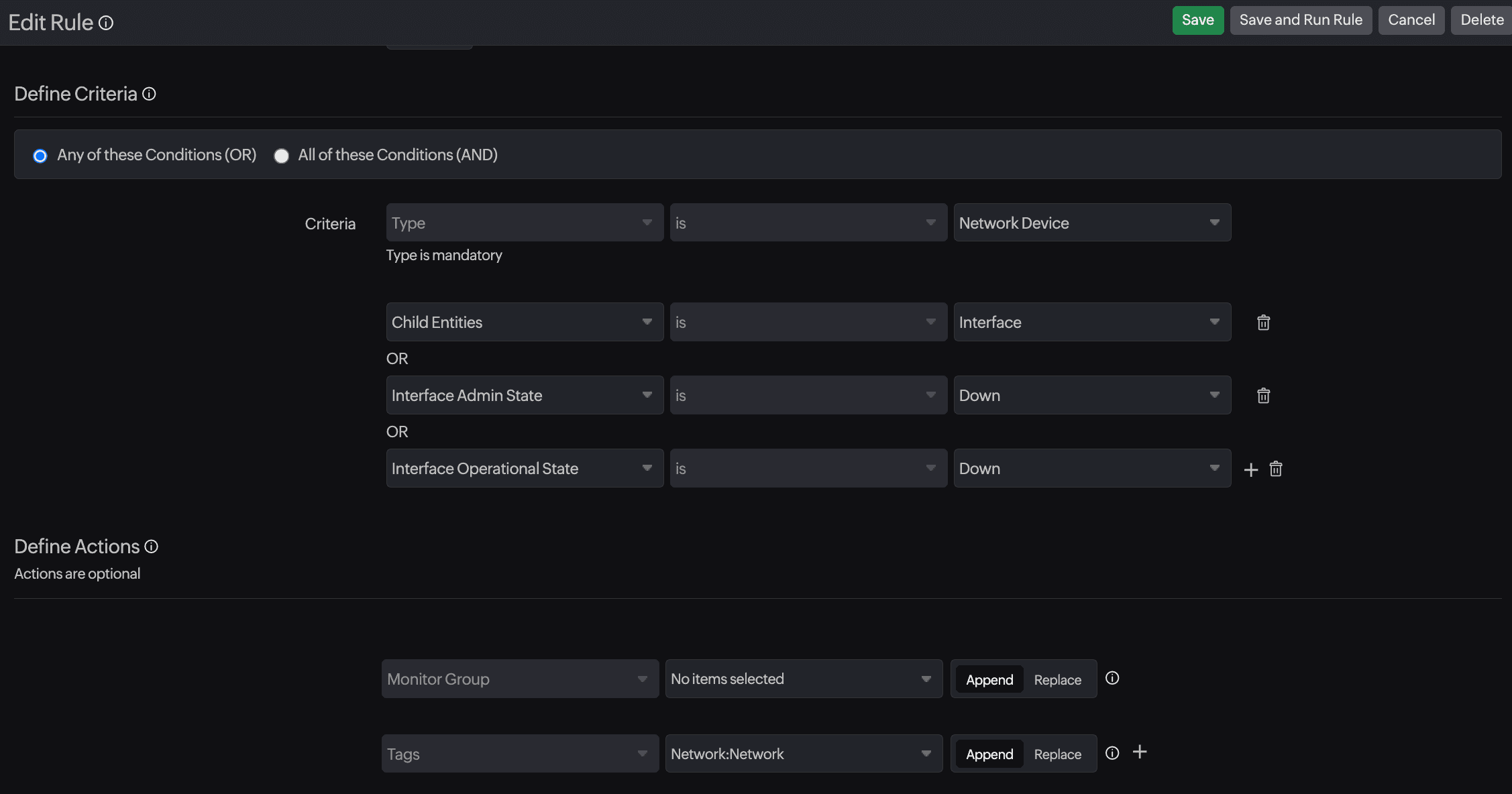
2.ダウン/無効になったバックアップリンクにタグを追加したい。
設定ルールで指定する「基準」:
- インターフェース状態:ダウン
- インターフェース管理状態:ダウン
アクション:
- 監視にタグを追加する
サポートされているインターフェースレベル
ルールを追加または編集する際は、タイプとしてネットワーク装置を選択し、Child
Entitiedsとしてインターフェースを指定します。
インターフェースレベルのマッチングでは、以下の属性がサポートされます。
| 属性 | 説明 |
|---|---|
| Interface Name | Match specific names (e.g., GigabitEthernet0/1, Vlan10). |
| Interface Type | Identify types such as Ethernet, loopback, VLAN, tunnel, and port channel. |
| Interface IP | Match based on assigned IP address. |
| Interface IP Type | Filter by IPv4 or IPv6. |
| Interface Operational State | Match interfaces that are up or down (link status). |
| Interface Admin State | Match interfaces configured as enabled/disabled. |
| Interface Status | Combine admin and operational states (e.g., Up/Up, Up/Down). |
| Monitor Name | Automatically rename interfaces based on match conditions for consistent naming. |
| Check Frequency | Set how often the matched interface should be polled. |
| Monitor Group | Add the matched interface to a selected Monitor Group. When a Monitor Group is selected as part of the rule action, the interface will be added to that group and will also be created as a separate monitor in Site24x7. |
| Monitor Tags | Append or replace tags to help with filtering, reporting, and automation. |
AND/OR ロジックを使用して1つ以上の条件を定義し、構成するインターフェースのセットを正確にターゲットにすることができます。
インターフェースの設定ルールの作成
- [管理]→[インベントリ]→[設定ルール]に移動します。
- [ルールの追加]をクリックします。
- 表示名とオプションの説明を入力します。
- 基準:
- タイプをネットワーク装置に設定します。
- Child Entitiedsを追加します。隣接するドロップダウンメニュー(+アイコン)から、 インターフェースを選択します。
- 必要に応じて追加のインターフェースレベルの基準を設定します。
- 「アクションの定義」で、自動的に適用するアクションを選択します。
- タグ
- 監視グループ
- IT自動化テンプレートは、Site24x7のネットワーク設定管理にも監視を追加することで、ネットワークインターフェースに対して実行できます。 自動化ドロップダウンメニューからテンプレートを選択し、次のフィールドで実行タイミングを選択し、「追加」をクリックして適用します。
- [保存]または[ルールを保存して実行]をクリックします。
設定ルールでサポートされるインターフェースアクション
設定ルールは自動的に適用されます
| アクション | 説明 |
|---|---|
| タグ | 分類とフィルタリングのためにタグを追加または置き換えます。 |
| 監視グループ | 管理を容易にするためにインターフェースを自動的にグループ化します。 |
すべてのアクションは追加または置換の動作をサポートします。
既存のインターフェースでルールを実行する
すでに検出されたネットワーク装置にルールを適用できます。
- [管理]→[設定ルール]に移動します。
- 該当のルールをクリックし、対象の装置/インターフェースを「基準」で設定します。
- 該当のルールにチェックを入れ、画面右上の[ルールの実行]をクリックします。
Site24x7は一致するすべてのインターフェースを処理し、設定を即座に更新します。
ベストプラクティス
- 特定の命名規則(例:WAN、Uplink、Core)を使用して、ルールの作成を簡素化します。
- インターフェースルールをモジュール化します。しきい値、グループ化、タグ付けごとに個別のルールを作成します。
- 自動適用を有効にする前に、「ルールの保存と実行」を使用してルールをテストします。
- 必要に応じて「他のルールの実行を停止」を使用してルールの順序を強制できます。