ヘルプ ネットワークメトリック ネットワーク監視
ネットワーク監視のパフォーマンスメトリック
目次
デバイスのパフォーマンススナップショットは、[監視ステータス]ページで表示できます。
デバイスパフォーマンス
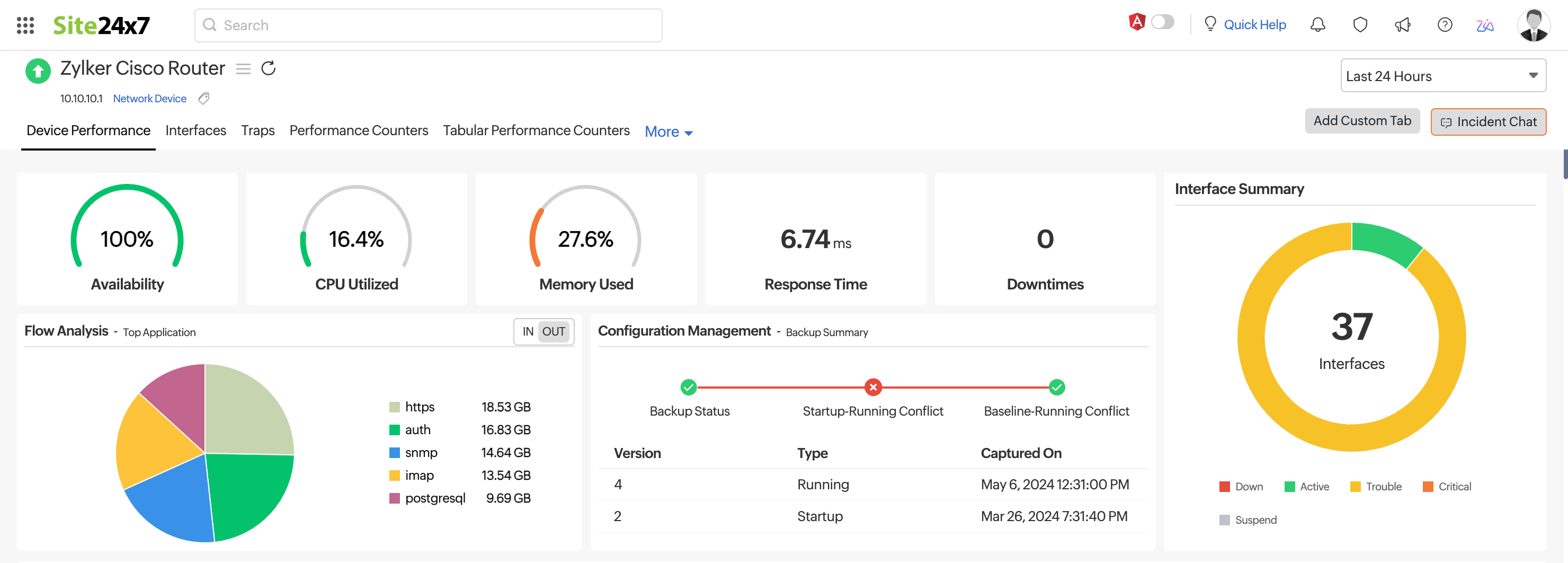
[ネットワークデバイス]ページでデバイス名をクリックし、表示される最初のタブ(デバイスパフォーマンス)を開くと、デバイスの可用性、応答時間、ダウンタイムの詳細を確認できます。
ここでは、可用性、ダウンタイム、イベントタイムライン、更新、応答時間、パケットロス、CPU使用率、メモリ使用率、デバイス詳細、ハードウェア詳細のウィジェットを表示できます。
CPU使用率とメモリ使用率のパフォーマンスカウンターを設定している場合は、ここで確認できます。デバイステンプレートを編集することで、カスタム監視メトリックを表示するように製品を設定することもできます。
インターフェース
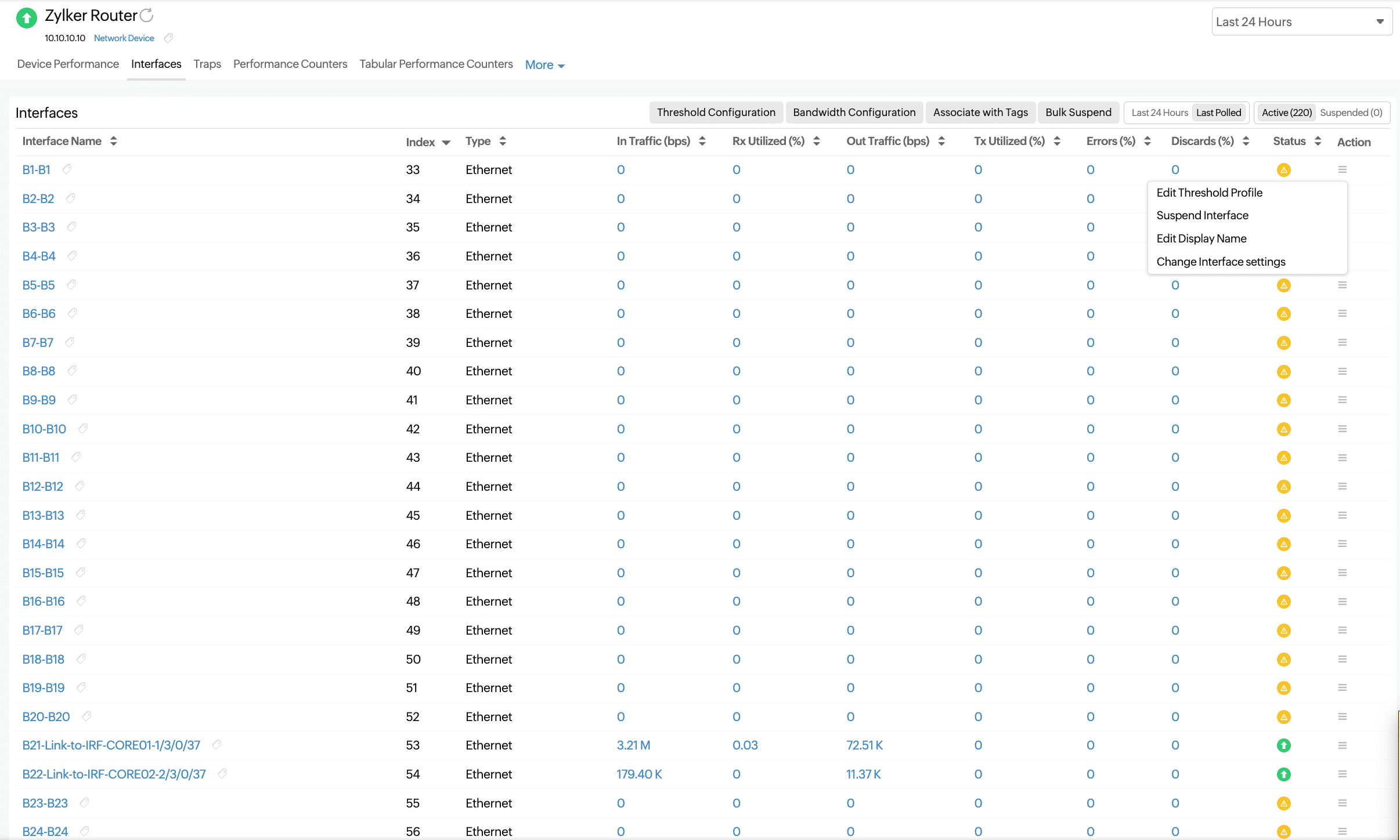
選択したデバイスのインターフェースのリストと、そのステータスおよびその他の詳細が表示されます。インターフェース名をクリックすると、その可用性と、トラフィックおよび帯域幅使用率のグラフが表示されます。
監視されているライセンス付きインターフェース(アクティブインターフェース)と監視されていないライセンスなしインターフェース(一時停止中のインターフェース)を切り替えます。
| パラメータ | 説明 |
|---|---|
| インターフェース名 | RFC 1213 から取得したインターフェース名 |
| インデックス | シリアルポート |
| タイプ | インターフェースのタイプ(イーサネットやVLANなど) |
| トラフィック(bps) | そのインターフェースが受信したトラフィック量(ビット/秒) |
| 受信利用率 (%) | インターフェースが受信トラフィックのうち使用している割合(パーセント) |
| 送信トラフィック (bps) | インターフェースから送信されたトラフィックの量(ビット/秒) |
| 送信利用率 (%) | インターフェースによって送信されたトラフィックの使用率(%) |
| エラー率 (%) | そのインターフェースが受信したパケットのうち、エラーパケットが占める割合(%) |
| 破棄率(%) | インターフェースによって破棄されたパケットの割合(総 パケット数に対する割合) |
| ステータス | インターフェースの状態:アップ、down、またはトラブル |
| アクション | ハンバーガーアイコン( )をクリックすると、しきい値プロファイルの編集、インターフェースの一時停止、表示名の編集、インターフェース設定の変更などのアクションが表示されます。 )をクリックすると、しきい値プロファイルの編集、インターフェースの一時停止、表示名の編集、インターフェース設定の変更などのアクションが表示されます。
|
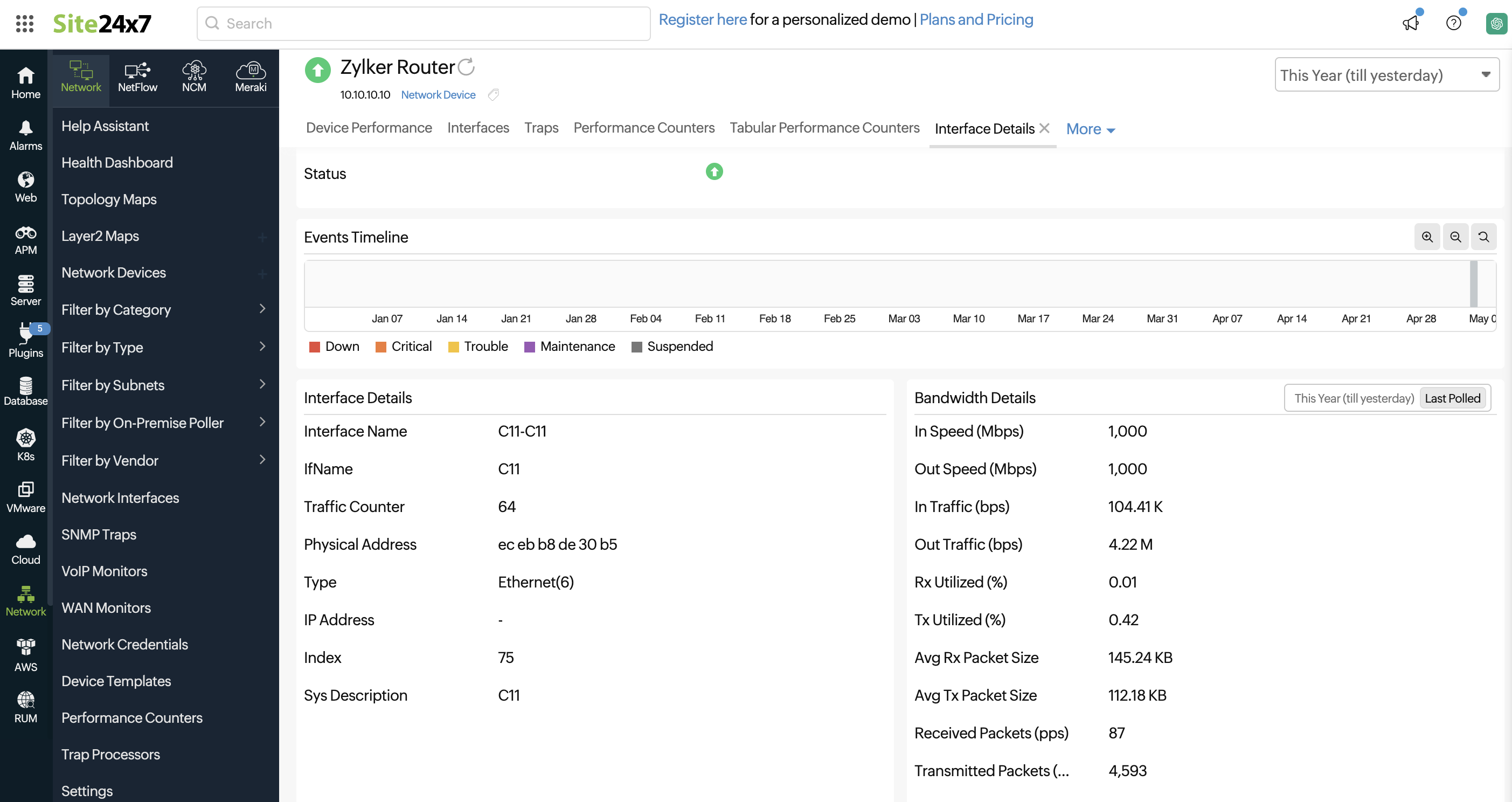
インターフェースをクリックすると、次の詳細が表示されます。
| パラメータ | 説明 |
|---|---|
| 管理状態 | インターフェースの管理状態:アップまたはダウン |
| 運用状態 | インターフェースの運用状態:アップ、トラブル、またはダウン |
| 受信利用率 | インターフェースによって利用された受信トラフィックの量 |
| 送信利用率 | インターフェースによって利用されている送信トラフィックの量 |
| 利用率 | 受信および送信トラフィックの利用量の平均値です |
| トラフィック | インターフェースが受信したトラフィックの量 |
| 送信トラフィック | そのインターフェースから送信されたトラフィックの量 |
| トラフィック | トラフィックの合計 |
| 受信パケット数 | そのインターフェースが受信したエラーパケットの数 |
| 送信パケット | そのインターフェースから送信されたエラーパケットの数 |
| パケット | そのインターフェースで処理されたパケットの総数 |
| 受信量 | 受信した総量(バイト単位) |
| 送信量 | 送信された総量(バイト単位) |
| データ量 | バイト単位の総データ量 |
| エラー率 (%) | インターフェースが受信したエラーパケットの割合(%) |
| 破棄率(%) | インターフェースによって破棄されたパケットの割合(総パケット数に対する割合) |
| エラー率および破棄率 | エラー率および破棄率の割合(平均値、最大値、最小値を含む) |
| エラーおよび破棄の件数 | エラーおよび廃棄の件数。平均値、最大値、最小値を含みます |
帯域幅の詳細も他のメトリックとともにキャプチャされます。
| パラメータ | 説明 |
|---|---|
| 速度(Mbps) | そのインターフェースが受信可能な帯域幅の量です。これは、 そのインターフェースのSNMP応答から得られる定数値です |
| 送信速度(Mbps) | そのインターフェースによって送信される帯域幅の量です。これは、 そのインターフェースのSNMP応答から得られる定数値です |
| 受信トラフィック(bps) | そのインターフェースが受信したトラフィックの量 |
| 送信トラフィック(bps) | そのインターフェースによって送信されたトラフィックの量です |
| 受信利用率(%) | インターフェースが受信したトラフィックのうち、利用された割合 |
| 送信利用率(%) | インターフェースが利用している送信トラフィックの量 |
| 平均受信パケットサイズ | 一定期間に受信されたパケットの平均サイズ |
| 平均送信パケットサイズ | 一定期間における送信パケットの平均サイズ |
| 受信パケット数 (pps) | そのインターフェースで受信されたエラーパケットの数 |
| 送信パケット数 (pps) | そのインターフェースから送信されたエラーパケットの数 |
パフォーマンスカウンター
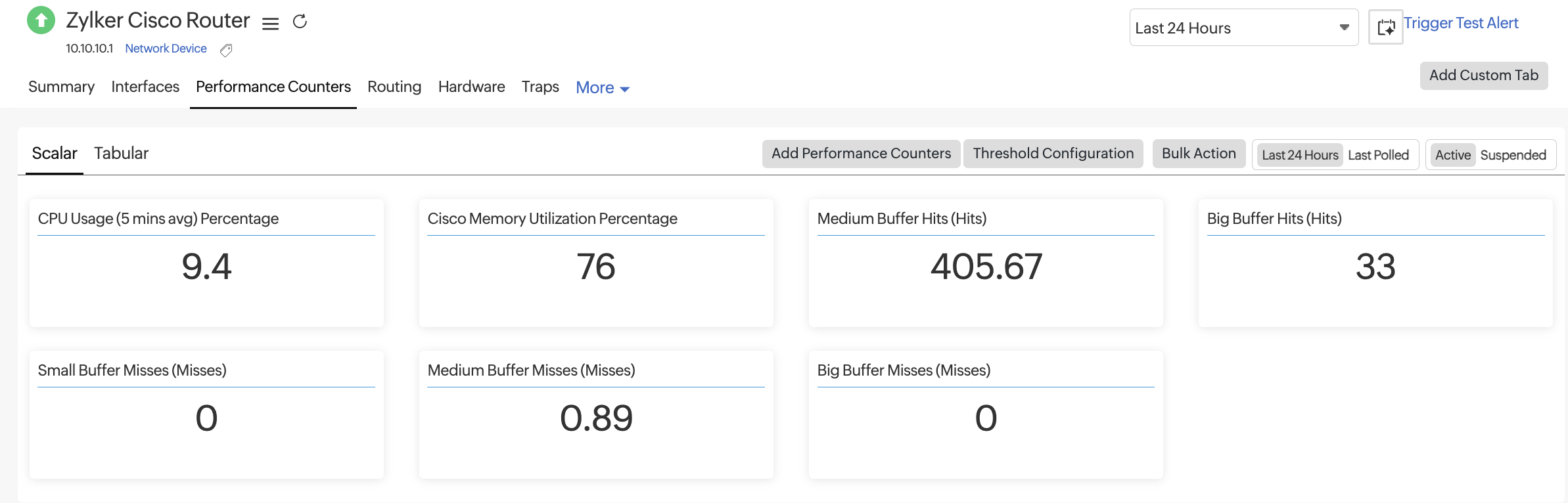
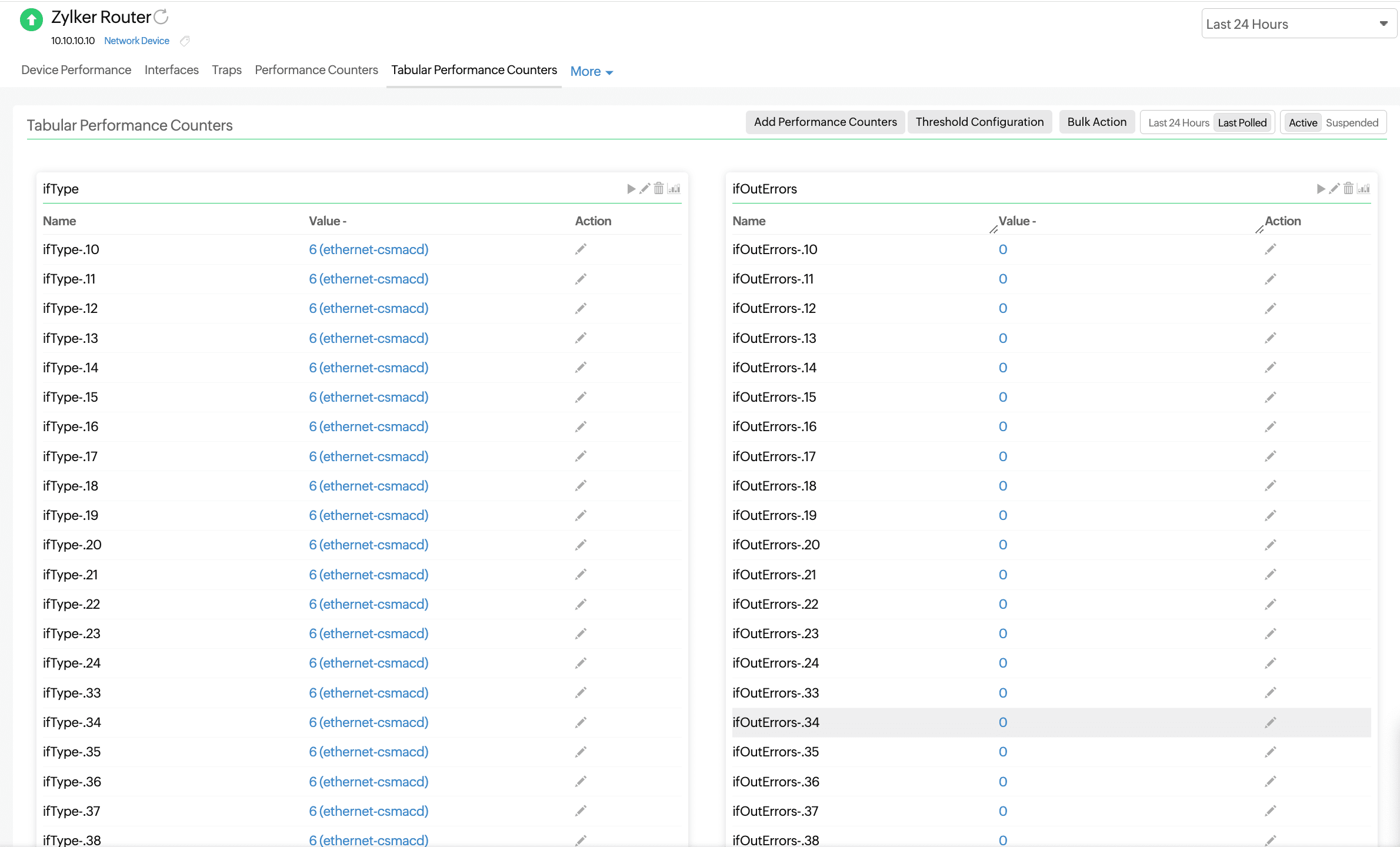
このタブには、デバイスに関連付けられたカスタムパフォーマンスカウンターが一覧表示されます。表の上部にある「スカラー」と「表形式」を切り替えると、それぞれのパフォーマンスカウンターが表示されます。
温度統計、メモリ使用率、CPU使用率など、単一の値を持つメトリックを表示します。
ネットワークデバイスの表形式のSNMPオブジェクト識別子を監視します。これにより、単一のネットワークデバイスにおいて、同じ属性(メモリ、ディスク、インターフェースなど)の複数のインスタンスを監視できます。
ルーティング
ネットワークに設定されているルーターの可用性と応答時間を追跡します。バッファヒット統計やバッファミス統計といった主要なルーターパフォーマンスメトリックを詳細に可視化します。
| セクション | 説明 | 目的 |
|---|---|---|
| BGPピアのメトリック | ステータス、稼働時間、フラップなど、BGPピアに関連するメトリクス | 外部または内部のピアとのBGPセッションの安定性とパフォーマンスを追跡するのに役立ちます |
| OSPFネイバーメトリック | 隣接状態、ネイバーID、およびコストなどのOSPFネイバーの詳細 | OSPFネイバー関係を監視し、OSPFドメイン内のルーティングの問題を検出します |
| EIGRPピアメトリクス | EIGRPピアの一覧およびそれらに関連付けられたルートメトリック | EIGRPのピアリングを検証し、ルーティング経路の 選択における変更を特定するのに役立ちます |
| バッファヒット統計 | 一定期間におけるバッファヒットの平均回数、およびバッファのサイズです。バッファには、huge、large、big、mediumの4種類があります | バッファメモリがどれほど効率的に使用されているかを示し、これはトラフィックの処理に影響を与えます |
| バッファミス統計 | 一定期間におけるバッファミスの平均回数と、それに伴うバッファのサイズです。ミスには、big、small、medium、およびlargeの4種類があります | トラフィックが、バッファの枯渇やボトルネックによって、ドロップまたは遅延しているかどうかを特定するのに役立ちます |
ハードウェア
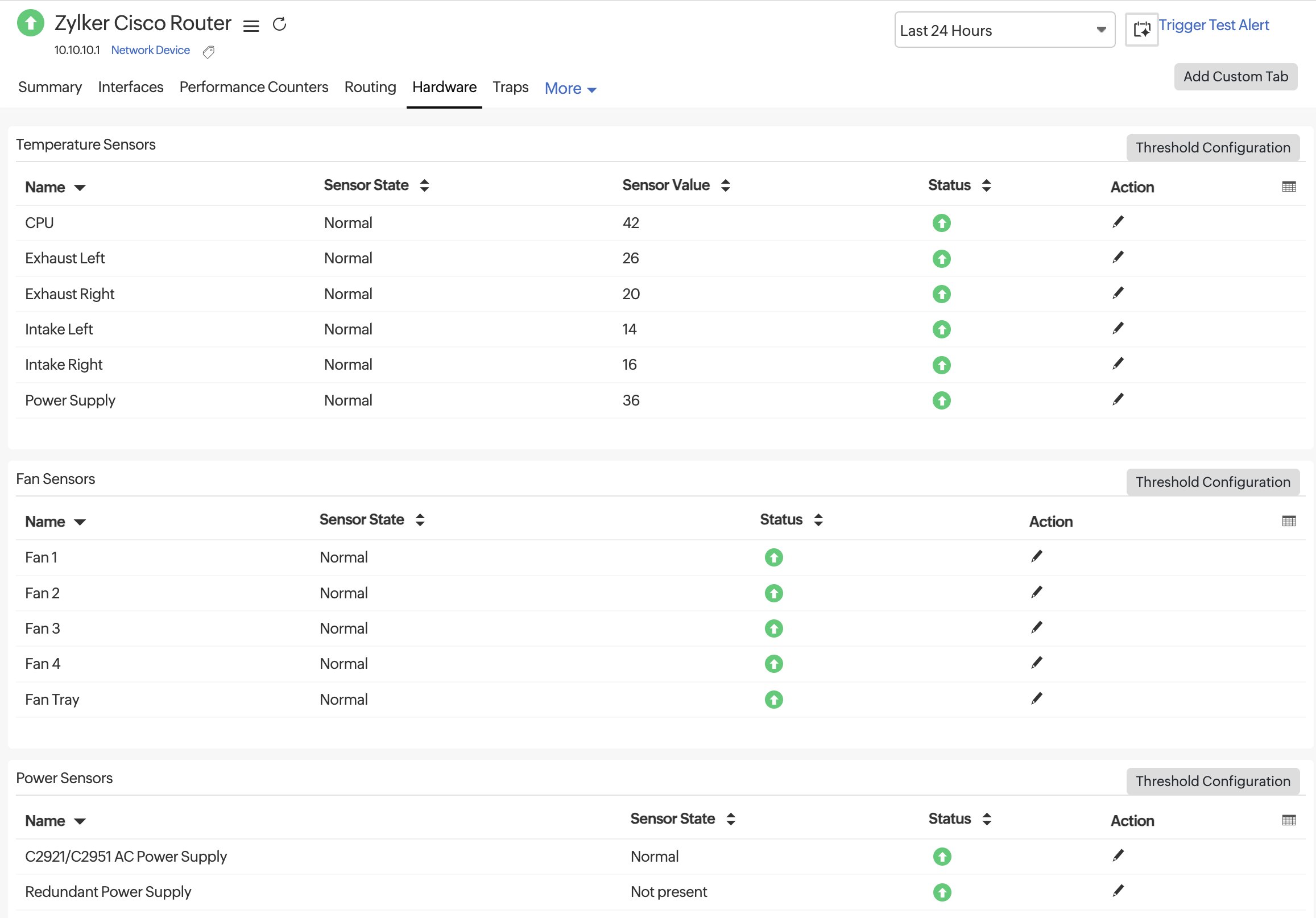
[ハードウェア]タブを使用して、Ciscoデバイスの物理的な正常性を監視します。このセクションには、温度、ファン速度、電源ステータスなどのセンサーレベルのデータが表示されます。センサーの状態、センサー値、ステータスを確認し、必要に応じて各行またはカテゴリのしきい値を設定できます。利用可能なセンサーは、温度センサー、ファンセンサー、電源センサーに分類されています。
各メトリックに表示される利用可能な列の説明は次のとおりです。
| メトリック | 説明 |
|---|---|
| 名称 | 監視対象のハードウェアコンポーネント |
| センサーの状態 | センサーの動作状態(例:正常、警告、または故障) |
| センサー値 | 摂氏(°C)単位でのリアルタイムの温度測定値 |
| ステータス | しきい値ルールに基づいたセンサーの全体的な健全性 |
| アクション | これにより、その特定の センサーのしきい値設定を編集することができます |
温度センサー
| 名前 | 説明 |
|---|---|
| CPU | デバイスのCPUの温度 |
| 左側排気 | デバイスの左側から排出される空気の温度 |
| 排気(右側) | デバイスの右側から排出される空気の温度 |
| 左側吸気 | シャーシの左側から流入する空気の温度 |
| 吸気(右側) | シャーシの右側から流入する空気の温度 |
| 電源 | 本機の電源ユニットの温度(過熱を検知するため) |
ファンセンサー
| 名前 | 説明 |
|---|---|
| ファン1 | 最初の内部ファンの動作状況 |
| ファン2 | 2番目の内蔵ファンの動作状況 |
| ファン3 | 3番目の内蔵ファンの動作状態 |
| ファン4 | 4番目の内蔵ファンの動作状態 |
| ファントレイ | 複数のファンを収納するファンアセンブリまたはトレイ全体の 動作状態 |
電力センサー
| 名前 | 説明 |
|---|---|
| C2921/C2951 AC電源ユニット | Cisco 2921および2951デバイス用のメインAC電源ユニットの状態 |
| 冗長電源供給 | メインの電源が故障した場合のフェイルオーバーに使用されるバックアップ電源モジュールの状態 |
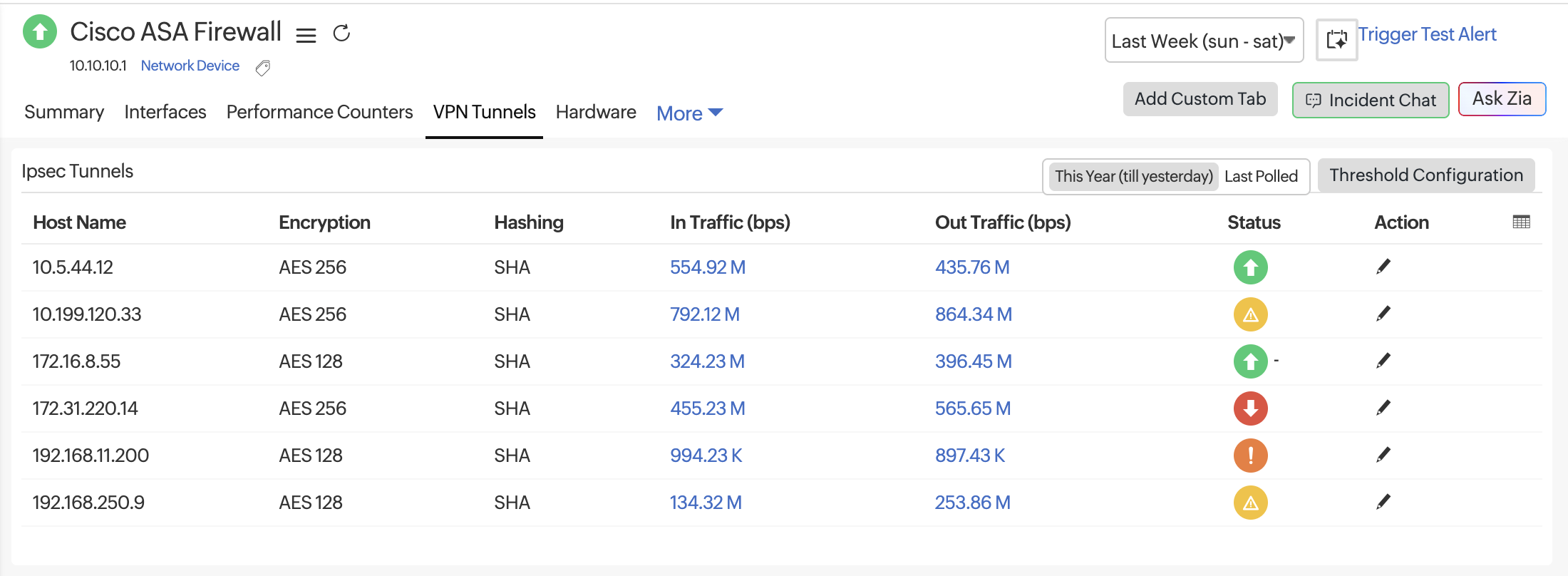
VPNトンネル
[VPNトンネル]タブには、監視対象のファイアウォールで検出されたすべてのIPsecトンネルが一覧表示されます。これらのメトリクスにより、トンネルの状態やサイト間のリアルタイムのトラフィックフローを追跡することができます。これらの情報を活用して、トンネルの不安定さや帯域幅の飽和などのトラブルシューティングを行ってください。
メトリクス
| メトリック | 説明 |
|---|---|
| トンネル名 | 監視対象のファイアウォールで設定されているIPsecトンネルの名前です。 |
| ホスト名 | IPsec接続に関連付けられたピアIPアドレスまたはトンネルエンドポイント。 |
| 暗号化 (FortiGateデバイスでは利用できません) |
VPNデータの保護に適用される暗号化アルゴリズム(例:AES-128、AES-256、または3DES)です。暗号化が設定されていない場合は「NONE」と表示されます。 |
| ハッシュ (FortiGate デバイスでは利用できません) |
使用されるハッシュ処理または整合性検証の方法(例:SHA、SHA-256、またはMD5)です。 | ローカルアドレス | トンネルのローカル側のIPアドレスです。 |
| インスタンス | トンネルに関連付けられたインターフェースまたは論理インスタンス識別子です。 |
| フェーズ1の名前 (FortiGateデバイスのみ利用可能) |
トンネルの確立に使用されるフェーズ1(IKE)セキュリティアソシエーションの名前です。 |
| フェーズ2の名前 (FortiGateデバイスでのみ利用可能) |
IPsecトラフィックパラメータのネゴシエーションに使用されるフェーズ2セキュリティアソシエーションの名前です。 |
| トラフィック(bps) | VPNトンネルを介する受信データ転送速度で、ビット/秒単位で測定されます。受信帯域幅の使用状況や負荷を把握するのに役立ちます。 |
| アウトバウンドトラフィック(bps) | VPNトンネルを経由するアウトバウンドのデータ転送速度で、ビット/秒単位で測定されます。アウトバウンドの帯域幅使用状況や、トラフィックの非対称性の可能性を把握するのに役立ちます。 |
| ステータス | トンネルの稼働状態を示します。緑色のアイコンは、トンネルがアクティブで正常であることを表し、赤色のアイコンはトンネルがダウンしていることを示します。 |
| アクション | 鉛筆アイコンをクリックすると、しきい値を編集するオプションが表示されます。 |